


Välkommen till EXPANSION EXPLORER, en helhetslösning för att upptäcka, installera och hantera Expansion-innehåll på Yamaha PSR-SX920/SX720/A5000 och Genos2 Arranger Workstations.


Välkommen till EXPANSION EXPLORER!
En helhetslösning för att upptäcka, installera och hantera Expansion-innehåll på Yamaha PSR-SX920/SX720/A5000 och Genos2 Arranger Workstations.
-
GENOMGÅNG AV APPEN
Förbättra din spelupplevelse med Expansion Explorer, som hjälper dig att hantera och installera Expansion-innehåll enklare.
-
Nyheter i version 1.5
Vi presenterar en ny Launcher-meny, Preset-sökning och smartare innehållshantering.
What is Expansion Content?
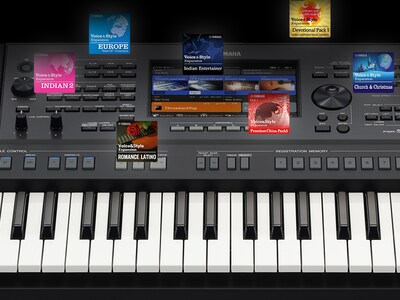
Expansion Content includes free additional Voices, Styles, MultiPads, and more for you to install and enjoy on your Arranger Workstation. A growing library of Expansion Content is already available, featuring a diverse range of instruments and Styles from around the world.
Sök
Få tillgång till Sök direkt från den nya Launcher-menyn och utforska både Expansion- och Preset-innehåll när du är ansluten till ditt instrument. Använd avancerade filter för att förfina resultaten efter land, tempo, takt och mer.

Style Recommendations
If you have an audio file of the song you want to play, EXPANSION EXPLORER can analyze it and recommend the most suitable Style from the Expansion Content library for your performance.

Pre-listen
Content can be auditioned in the app before installation. You can listen to the auditions anytime, even without being connected to your instrument.

Install
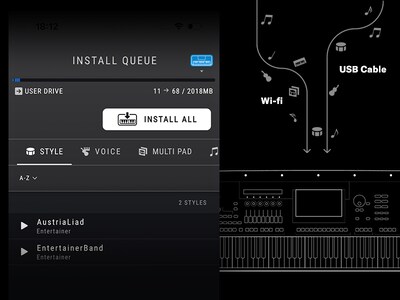
The app installs your chosen content directly to your instrument. Depending on your instrument’s specification, this is done wirelessly or via a USB cable.
Innehållshantering
Hantera dina registreringsbanker och spellistor med lätthet – visa innehåll, byt namn på objekt och justera ordningen. På Windows och Mac kan du även importera och installera tredjepartsinnehåll som paket, stilar, ljud, låtar och registreringar direkt till ditt anslutna instrument.

Cautions
Contents already installed by Yamaha Expansion Manager into the Expansion area of your keyboard, including pre-installed content in PSR-SX920 and 720, will be removed when installing new content from Yamaha EXPANSION EXPLORER.
About pre-installed content in PSR-SX920 and 720, you will be able to reinstall them through the EXPANSION EXPLORER app, if desired.
* Specifications are subject to change without notice. The colors and finishes shown may vary from those on the actual products.
